 zyros
zyrosI’ll have to come around and attach more screenshots here!
Background
Editors are controversial. This is my opinion, and I’m not trying to persuade you.
I mostly use JetBrains for my day-to-day, and Visual Studio Code for anything smaller. A lot of people start looking into Neovim, Emacs or something else as undergraduates and want to build their own editor. Or maybe they’re looking for an AI-powered editor like Cursor, Windsurf, or Trae. After a few years of working, I still mostly use JetBrains editors for almost everything. This page says why I do this, but I won’t be trying to convince you. I’m sure VIm using 5 kilobytes of ram is great.
Also, I know neovim or VS code are not IDEs, and I should be comparing IDEs here. However, my experience with visual studio was incredibly bad and the next IDE around is Eclipse. I’m sure it’s possible to enjoy visual studio, but most of its user experience did not make sense to me.
Reasons
Setup
Setting up a JetBrains is bliss.
- Pick the IDE for the language and download it
- Pick a colour theme, I use Catppuccin
- Optionally, download ideavim and paste in your custom config
- Open the project
That’s basically it, really. Your LSP and highlight already works, you can press run and it actually runs. Heck, you can even press debug or profile and it immediately works! Refactoring, renaming and generating code all work out of the box!
Now, what does this look like for neovim?
- Learn how to configure it! Here is a 34 minute video!
- Go through and spend several hours customising this!
- Wait, you wanted a debugger or a run button? Time to program it!
- Or maybe you go to a distro like LazyVim?
This is great if you want to treat your editor as a hobby project. At the end of it you get that classic neovim aesthetic that always looks good in screenshots, and reasonable keybindings that make sense to you.
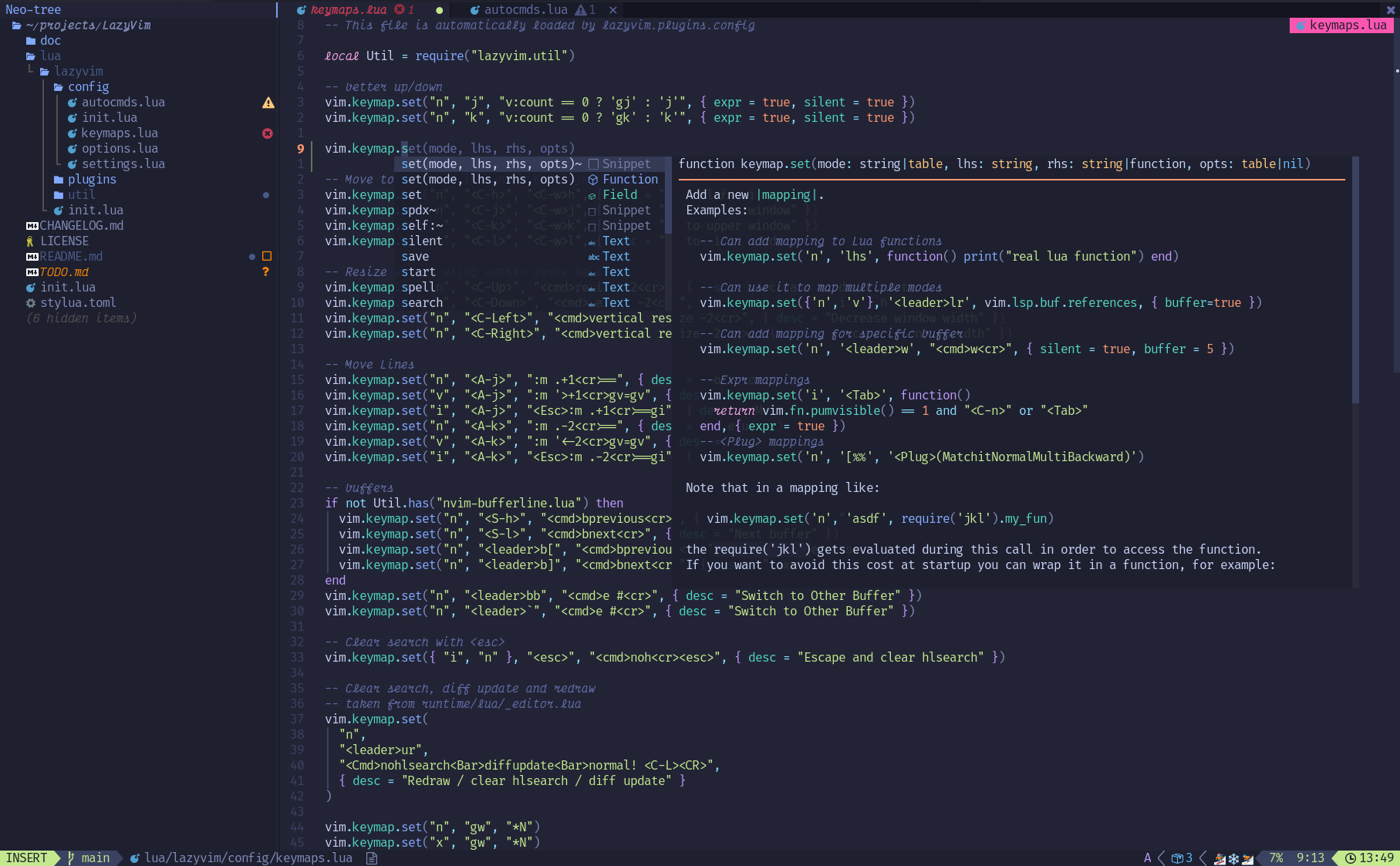
this is from https://www.lazyvim.org/ ‘s front page
You could argue VS code is easier!
- Install VS code
- Install a plugin for every feature you want
- Plugins start getting overlapping features
JetBrains search everything
Search everywhere in JetBrains is unlike any other editor’s search everywhere that I’ve seen.
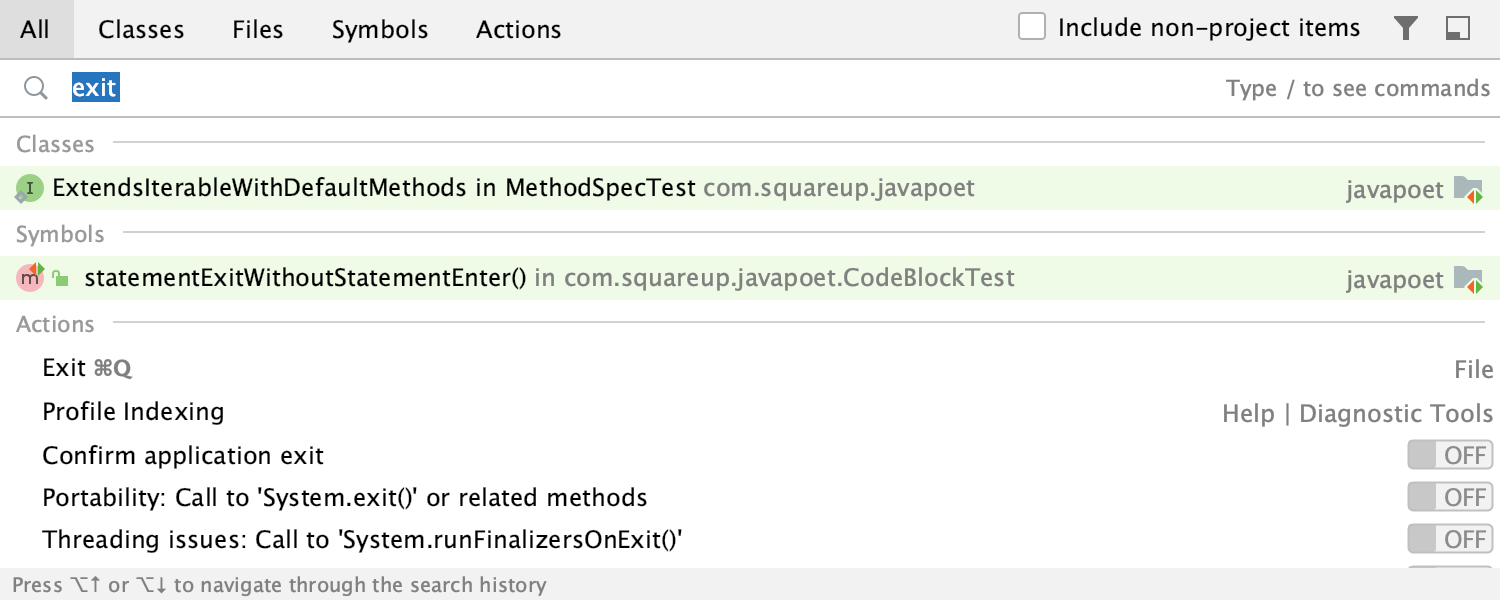
It actually searches everywhere! you can search function names, class names, file names, settings, commands like Git commit, or change to dark mode. All in one box! You will have to control + shift + F to search everywhere, though.
Visual studio code has a Command Palette that you can open with control + shift + p, or command + shift + p. Here you can search commands. Nothing else. If you backspace, you can search for files. if you type #, apparently, you can find functions and classes in the workspace or @ to search your current file. Not a single global search. So make sure to memorise that!
In neovim it’s probably possible, but again, everything is possible in neovim if you sink enough time configuring it. The default configurations I’ve seen have individual searches.
JetBrains Git
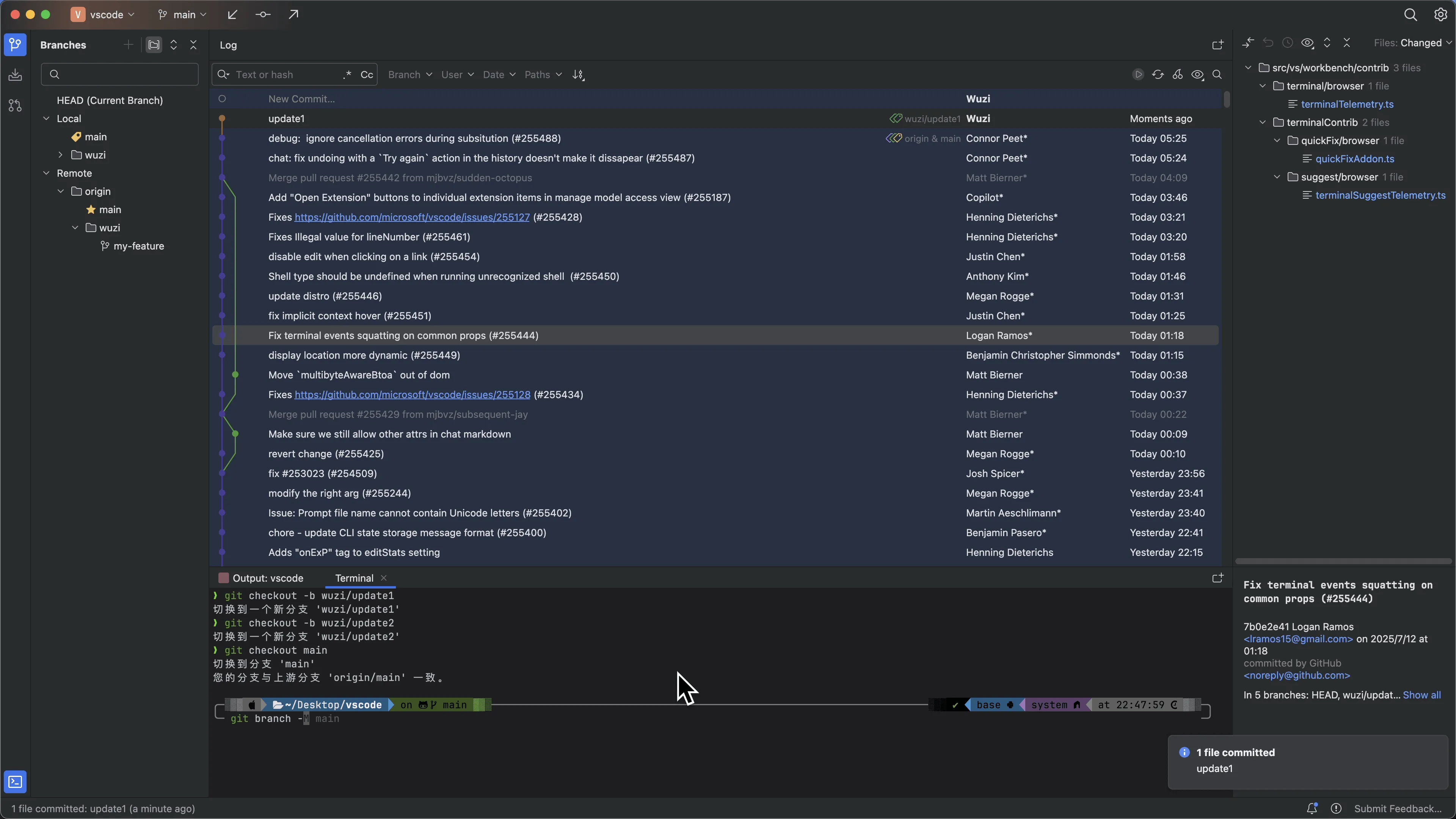
This is a screenshot of a git editor in Jetbrains. It makes sense. You have your git tree in the centre, and branches on the left. You can right click on things in the tree to do commands. Simple.
Here is the default VS code one:
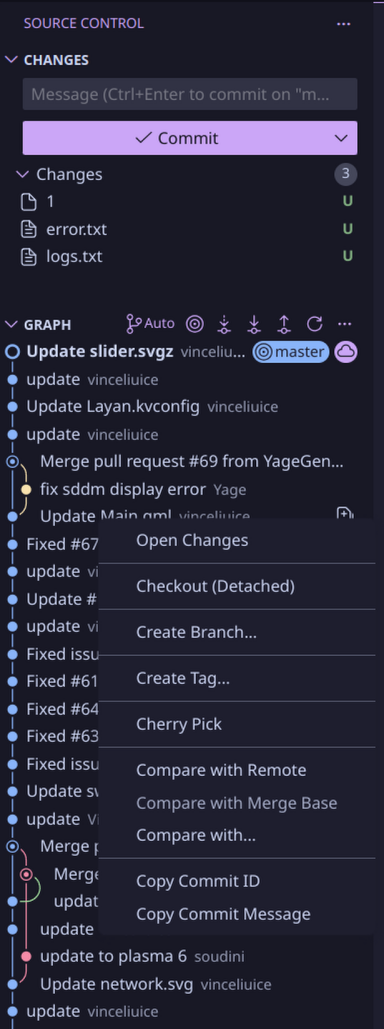
If you right click you can… wait… Where are my branches? This repo has multiple branches, do I need to scroll down and find them, or type them out from memory into the command palette? Hang on, there isn’t a squash button in that right click menu! You’ll see there are loads of problems, but it’s okay we can install some extensions in two minutes.

How many extensions do I need to install for version control to function? I’m sure you get there in the end, but now you might also have to navigate through many menus to do what you want, and it isn’t going to be a consistent experience from one VS code installation to the next so you might not get faster at it.
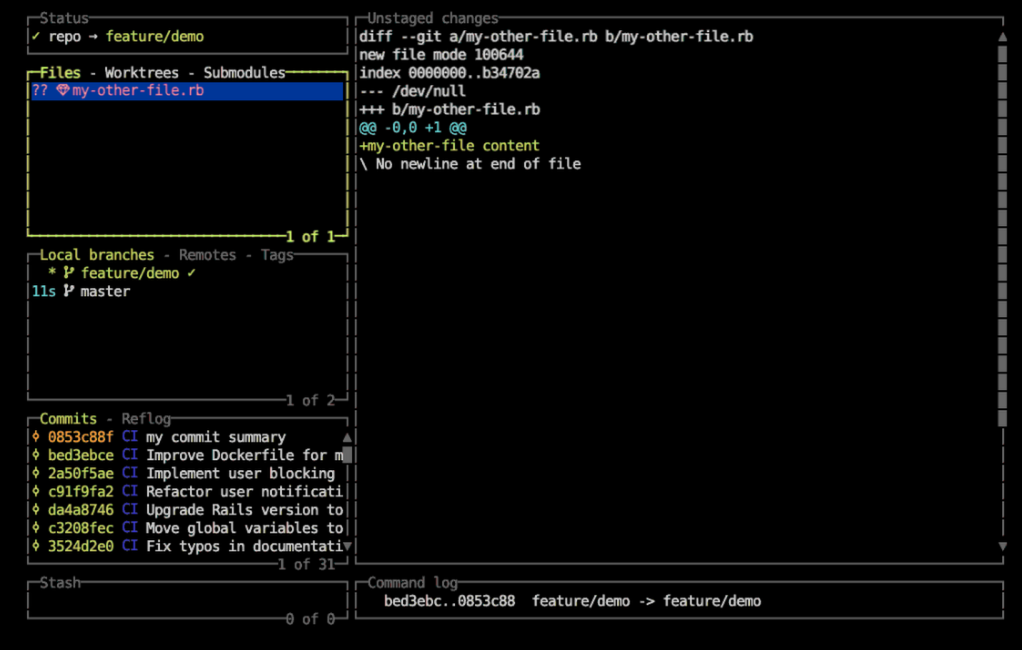
Meanwhile, in Neovim, let’s go read reddit posts for how to use git. It seems Lazygit is the most popular. Alright, let’s go read this tutorial about how to use it. It’s quite long. 2000 words. I’m sure it’s good if you have the time.
What about AI?
Just use a CLI tool, or something that integrates into JetBrains.
If an AI tool isn’t available through a CLI, it breaks my workflow. I prefer tools that integrate into my environment rather than forcing into theirs. Any serious tool should know that people don’t want to move their editor over to them.
The unfortunate situation is if your company gives you a GitHub Copilot, or a Trae subscription. Then you’re locked into that user interface. I usually still use JetBrains and that editor on a different workspace in this situation. Now it’s costing me RAM.
You can go faster in Neovim!
Yes. With vim, you can edit faster. You can have vim and all the same keybindings inside JetBrains and a friendlier time with it!
I like how my editor looks!
Alright. That is a good reason. You’re looking at this thing for hours a day. You can customise how JetBrains looks, but it’ll never look like doom emacs.
It sucks for my language!
Yep. Another good reason. If you’re writing OCaml, then you can’t really use a JetBrains product. Even C++, CLion can be quite slow compared to VS code because its linter is trying to do so much. Interestingly enough, RustRover is very good!
Conclusion
Editors are a controversial topic. Developers get attached to their editor because they need to use it for hours a day. I’m sure if I sat down and used neovim for 200 hours, I’d probably start liking it. But then I get a new job, and now I need to set it up again or maintain my dot files somewhere. JetBrains has the big issue that you need to pay, and in theory they could take your license at any time because you don’t own the software.
The core reason, then, is that JetBrains respects my time, the learning curve felt approachable, and it’s a massive time sink to learn something else. From my understanding, I won’t become faster in the long-term by learning a new editor. I do still use VS code heavily when I only plan to edit for an hour, or neovim if I plan on editing for a minute.
Here is my .vimrc for ideavim! Normal mode has vim keybindings, insert mode has JetBrains bindings.
" Needs you to install the which-key plugin. I don't think I use any others...
set surround
set multiple-cursors
set commentary
set argtextobj
set easymotion
set textobj-entire
set ReplaceWithRegister
set exchange

Plug 'machakann/vim-highlightedyank'
set which-key
set notimeout

unmap grr

" https://gist.github.com/zchee/9c78f91cc5ad771c1f5d
" Custom hotkeys
nmap gI :action GotoImplementation<CR>
let g:WhichKeyDesc_goto_implementation = "gI go to implementation"

nmap gd :action GotoDeclaration<CR>
let g:WhichKeyDesc_gd = "gd Go to Definition"

nmap gr :action ShowUsages<CR>
let g:WhichKeyDesc_gr = "gr Show References"

nmap gR :action FindUsages<CR>
let g:WhichKeyDesc_gI = "gI Go to Implementation"

nmap gI :action GotoImplementation<CR>
let g:WhichKeyDesc_gy = "gy Go to Type Definition"

nmap gy :action GotoTypeDeclaration<CR>
let g:WhichKeyDesc_gD = "gD Go to Declaration"

nmap gD :action GotoDeclaration<CR>
let g:WhichKeyDesc_gR = "gR Find Usages"

nmap gs :action GotoSuperMethod<CR>
let g:WhichKeyDesc_gs = "gs Go to Super Class"

nmap gi :action ShowInheritors<CR>
let g:WhichKeyDesc_gi = "gi Show Inheritors"

let g:WhichKey_FontSize=16
let g:highlightedyank_highlight_duration = "150"


nmap <leader>rr :action Run<CR>
let g:WhichKeyDesc_run = "<leader>rr Run Configuration"

nmap <leader>rd :action Debug<CR>
let g:WhichKeyDesc_debug = "<leader>rd Debug"

nmap <leader>rs :action Stop<CR> :action Stop<CR>
let g:WhichKeyDesc_stop = "<leader>rs Stop Run"

map <leader>gL :action ActivateVersionControlToolWindow<CR>
let g:WhichKeyDesc_git_log = "<leader>gL Open git "

nmap <leader>gs :action Git.Stash<CR>
let g:WhichKeyDesc_git_stash = "<leader>gs Stash "

nmap <leader>gp :action Git.Pull<CR>
let g:WhichKeyDesc_git_pull = "<leader>gp Pull "

nmap <leader>gk :action Git.Commit.Stage<CR>
let g:WhichKeyDesc_git_commit = "<leader>gk Commit "

nmap <leader>gK :action Vcs.Push<CR>
let g:WhichKeyDesc_git_push = "<leader>gK Commit "

nmap <leader>c :action Generate<CR>
let g:WhichKeyDesc_generate = "<leader>c Generate "

sethandler i:ide v:vim
sethandler <C-[> i-v:vim
sethandler <C-f> i-v:ide n:ide
sethandler <C-c> i-v:ide n:ide

let mapleader = " "
nmap <space> <Leader>

" Move screen up by a page without moving the cursor
nnoremap <Leader>d 30<C-E>
nnoremap <Leader>u 30<C-Y>

" Bind our clipboard to <space><clipboard actions>
nnoremap <Leader>yy "+yy
vnoremap <Leader>y "+y

nnoremap <Leader>p "+p
vnoremap <Leader>p "+p
nnoremap <Leader>P "+P
vnoremap <Leader>P "+P
set ideajoin
set ideaput
set ideamarks

map H h

set scrolloff=5
set incsearch
map Q gq

nnoremap <C-l> <C-w>l
nnoremap <C-k> <C-w>k
nnoremap <C-j> <C-w>j
nnoremap <C-h> <C-w>h